01 October 2013

Undercover meets Mavericks

Today we released Undercover 5.5, a free upgrade that also works on Apple's soon-to-be-released OS X Mavericks. We encourage you to upgrade asap to guarantee that your Mac remains protected. You can grab Undercover 5.5 from https://undercoverhq.com/download.
Previous versions of Undercover are incompatible with OS X Mavericks and are therefore unable to recover your Mac in case it gets stolen.

Undercover Debriefings


With Undercover 5.5, we also introduce Undercover Debriefings. These are monthly notifications about your Mac's Undercover status, including tips on how to improve recovery chances.
Expect your first notification to arrive later this month!


19 June 2013

Looking for guidance

We strive towards making our software straightforward and easy to install (and hopefully it is!), but sometimes you just want to have a manual at hand to make sure your theft-recovery system or your home alarm is set up right and you have everything covered.

To learn more about how you can get the most out of your Undercover installation, you can download a PDF with all the instructions here: www.orbicule.com/undercover/mac/UndercoverGuide.pdf

As of today, we also have a user guide for Witness available. Get it while it’s hot! www.orbicule.com/witness/WitnessUserGuide.pdf

04 June 2013

Even more recovery stories

It seems like Undercover keeps impressing the police, and they sure did an excellent job finding these three user's Macs. Read all about it at http://www.orbicule.com/undercover/mac/recovery.php

21 May 2013

Witness and AppleScript: Using Calendar to set a schedule for your alarm

A lot of users are asking about the possibility of setting up a schedule for Witness, auto-arming the alarm at specific times every day. We have not yet implemented such a feature, as we feel this would make the app much more complex, but there is a solution for those in desperate need of a schedule. All you'll need is Calendar, and a script to tell Witness to activate the alarm.

Step 1: the script

You can activate Witness with AppleScript using the following command:

tell application "WitnessUserAgent" to activate

This will activate the alarm on all your Macs (but not on those that have been excluded). To deactivate, you can replace "activate" with "deactivate".

You can download these simple scripts here: https://dl.dropboxusercontent.com/u/19163287/
witness/AppleScript%20samples/DeActivate.zip

Step 2: Calendar

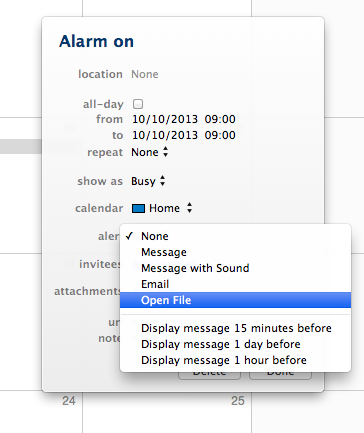
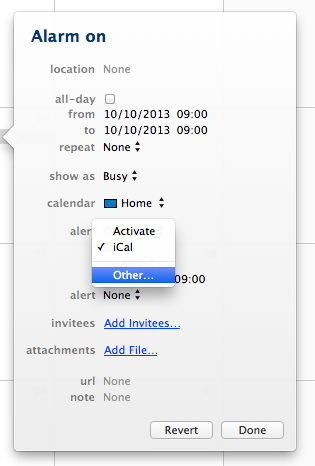
Unfortunately, Apple has removed the ability to run a script from Calendar in Mountain Lion, but there is a workaround: you can save the script as an Application, and then choose “Open File” as the alert option when you create an event in Calendar.

Choose “Other” to select the Application file you want to open.

You'll find the scripts saved as Applications in our download link above as well.

14 May 2013

New recovery stories

We’d fallen a little behind on Undercover’s Recovery stories page, but I have (hopefully) made that up to you by posting a whole batch of testimonials from our users today! Check it out: www.orbicule.com/undercover/mac/recovery.html

You can also find Witness success stories at http://www.orbicule.com/witness/success